|
What is InstaSync™?
Having the miniSync is already so convenient, but wish there was a way to easily start a HotSync? Now you can save yourself the time and hassle of finding the HotSync application!
Installing InstaSync™ on your PalmOS device will enable it to automatically detect a connection and start a HotSync immediately, or at your desired time interval!
How Do You Use InstaSync™?
To Enable or Disable InstaSync™ - To enable or disable InstaSync™, toggle the On/Off switch.
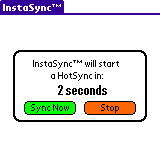
Adjustable InstaSync™ Countdown Timer - You can set a time delay before you would like InstaSync™ to begin. Click on the arrow (drop-down menu) to show the InstaSync™ timer options. When your PalmOS is connected to miniSync or inserted into its cradle, InstaSync™ will begin the countdown to the interval that you've selected.
You can also set the InstaSync™ timer to "Immediate" to start a HotSync as soon as your PalmOS device is connected!
To Begin a HotSync at Anytime - You can begin a HotSync at any time on the InstaSync™ screen. Just click on the "Sync Now" button and a HotSync will begin immediately.
To Cancel the HotSync - When InstaSync™ begins a countdown, press "Stop" button to cancel the HotSync.
System Requirements
Operating System - Palm OS v4.0 or later. (Not compatible with the Handspring Treo 600)
Memory - 30KB of free Palm memory
How to Install / Register
Step 1 - Download the trial version of InstaSync™
Step 2 - Purchase InstaSync™
Step 3 - Register InstaSync™ by following the instructions listed in your order confirmation email.
|
|
|